TREK: Total Interface
NSTEnterprisesPersonalization
4.7769.00 Reviews
- Version
- 28.0
- Installs
- 50.00K
- Age Rating
- Everyone
Screenshots
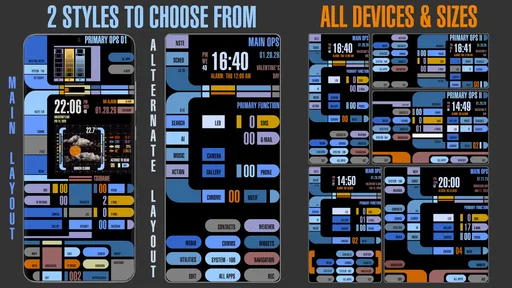
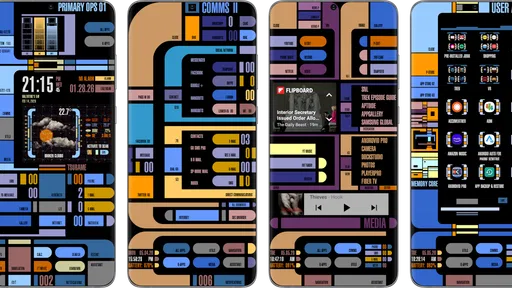
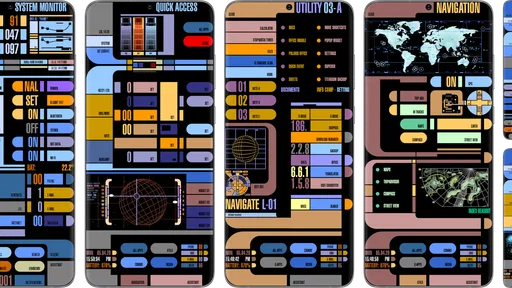
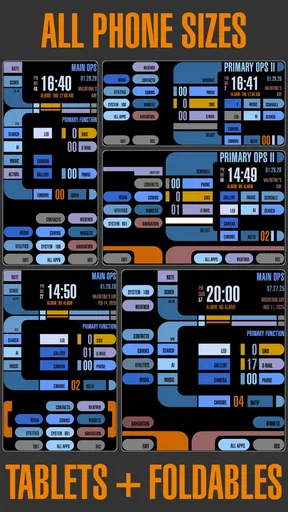
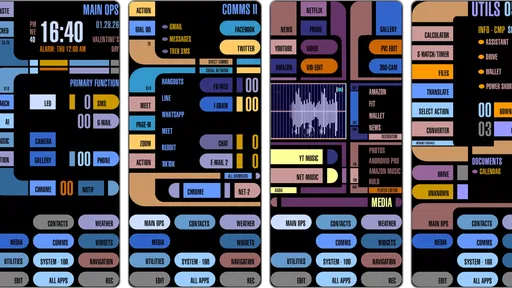
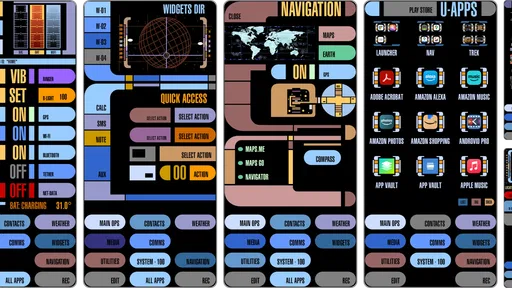
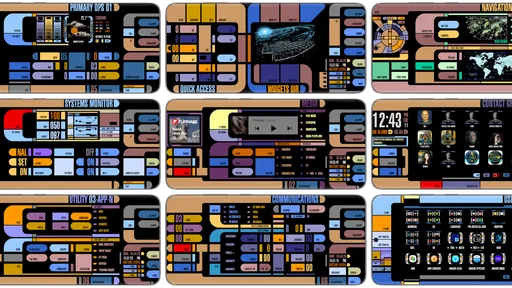
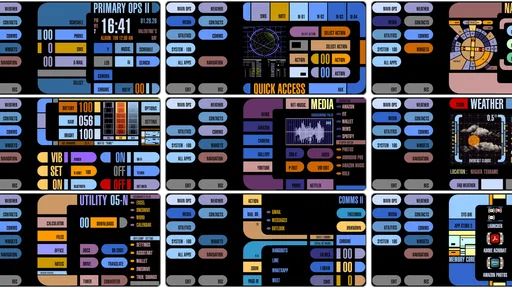
Our Review of TREK: Total Interface
 Analysis by Appyee
I installed TREK: Total Interface expecting a decorative home-screen theme, but it is better understood as a complete personalization layer for Android. It changes the way the home screen feels through animation and sound rather than simply placing a static picture behind your icons. That distinction matters: this is for someone who wants the phone to have a strong identity every time the screen is opened, not for someone looking for a quiet wallpaper and nothing more.
My first impression was that TREK asks you to treat the home screen as an environment. The appeal is immediate if you enjoy science-fiction styling, motion, and a more theatrical interface. At the same time, that personality creates the main question I kept returning to during use: do you want your phone to feel like a themed device every day, or do you prefer the speed and visual calm of a standard launcher? TREK makes a convincing case for the first option, but it is not automatically the better choice for everyone.
How TREK feels as a daily home-screen replacement
The app sits in the personalization category, and that description is accurate without capturing its character. NSTEnterprises presents it as a full interface for the home screen, so the experience is broader than changing an icon pack or applying a background. The animation and sound are part of the interaction, which gives ordinary actions more atmosphere. Opening the phone can feel like entering a designed space instead of returning to a collection of shortcuts.
That atmosphere is the strongest reason to use it. I can imagine choosing TREK for a personal device that I want to feel distinctive, especially if the default Android home screen seems visually flat. It also makes sense for a themed setup where the interface itself is part of the enjoyment. The design is not trying to disappear behind your apps; it wants to be noticed.
The trade-off is that a visually active home screen can compete with the practical job of finding an app quickly. A conventional launcher usually wins when I am in a hurry, because its layout is familiar and its feedback is restrained. TREK is more memorable, but memorable interfaces can require a short adjustment period. The more you value mood and presentation, the easier that compromise is to accept.
What the animation adds, and where it can get in the way
Animation gives the interface its sense of movement. Instead of a static arrangement that looks the same every time, TREK makes the transition into the home screen feel intentional. This is a useful difference for people who enjoy customization as an experience rather than as a one-time setup task. The phone feels more personal because the interface has behavior, not just decoration.
Still, motion is not universally helpful. If you check your phone repeatedly for quick tasks, even small visual effects may feel like an extra layer between you and the app you need. I would be cautious about choosing this as a work-focused setup where efficiency matters more than style. The right question is not whether animation looks attractive; it is whether you will still enjoy seeing it after the novelty has settled.
Sound creates a similar split. It can make the interface feel more complete and reinforce the theme, which is something a wallpaper cannot do. However, sound is also more situational than visual customization. In a quiet office, on public transport, or beside someone sleeping, I would want to be selective about when the phone is expressive. Anyone considering TREK should think about the phone’s everyday surroundings, not only how it looks in a few minutes of setup.
A realistic morning routine
Consider a normal morning: I unlock the phone, glance at the home screen, open a calendar, answer a message, and launch a music app before leaving. TREK can make that first interaction more enjoyable, especially if I like the themed presentation. The interface gives the routine a little character before the practical work begins.
But the same routine also exposes the limits. If I am late and need to reach the calendar immediately, a traditional launcher may feel more direct. TREK is most comfortable when I am willing to engage with the interface rather than treat it as invisible plumbing. That makes it a good fit for a personal phone used for enjoyment, while a plain launcher may be better for a device used almost entirely as a tool.
What the current version tells me about its evolution
The current release is version 28.0, and that gives TREK the feel of a product that has been maintained beyond its original launch. It first appeared on February 13, 2016, so this is not a brand-new experiment trying to prove that an animated home screen can work. The important takeaway is continuity: the concept has remained relevant enough to receive a substantial current version rather than being left as a one-off visual novelty.
I would not read the version number as a promise that every modern expectation is covered. A long-lived app can preserve a distinctive idea while still feeling different from newer Android interfaces. What matters here is that TREK has had time to develop its own identity. I approached it less like a temporary theme and more like a complete alternative to the ordinary home screen.
The minimum operating-system requirement is Android 4.0, which is unusually broad by current standards. That makes TREK accessible on older compatible devices, and it may be useful to someone keeping an older phone alive for a specific purpose. The practical caution is that compatibility across a wide range of devices does not guarantee the same feel everywhere. Animation and sound can be experienced differently depending on the phone, its age, and the rest of its software environment.
For existing users, the current version is encouraging because it suggests that the app remains an active part of the developer’s catalog. For new users, I would focus less on the number attached to the release and more on whether the core concept still matches your habits. TREK’s identity comes from its complete interface approach, not from chasing the appearance of a standard launcher.
What changes mean for someone already using it
If you already enjoy TREK, the most valuable part of its evolution is likely stability of purpose. The app has not abandoned the idea of a home screen built around animation and sound. That consistency is important for a themed interface: changing the central experience too aggressively could remove the very personality that made it appealing.
Existing users should still revisit their setup after an update rather than assuming everything feels exactly as before. A full interface affects the first moments of every phone session, so small changes in behavior can matter more than they would in an ordinary wallpaper app. I would spend a few minutes testing the home screen, opening the apps I use most, and checking whether the visual rhythm still feels comfortable during a rushed task.
There is also a psychological advantage to a mature, recognizable interface. Once the arrangement becomes familiar, the initial theatrical effect can turn into a kind of personal routine. The home screen stops being a novelty and becomes a cue that the device belongs to you. That is a more durable benefit than simply impressing someone when they first see it.
How it compares with ordinary personalization tools
A wallpaper app is the simplest alternative. It changes the background while leaving the launcher’s behavior alone, so it is easier to live with and less likely to interrupt a familiar workflow. An icon pack goes a step further by changing the visual language of shortcuts, but it still normally preserves the standard structure. TREK is more ambitious because it treats the whole home-screen experience as the object being customized.
A conventional third-party launcher is the closer comparison. Launchers usually focus on layout control, app organization, gestures, and practical efficiency. TREK’s appeal is different: it emphasizes the feeling of the interface, with animation and sound at the center. If you want folders, a carefully optimized grid, and a quiet path to every app, a utility-first launcher may suit you better. If you want the home screen itself to be expressive, TREK has a clearer personality than most minimalist alternatives.
The choice also depends on how often you change themes. If you enjoy rebuilding your phone regularly, TREK can be one part of a broader customization hobby. If you want to set everything once and never think about it again, its full-interface approach may be more commitment than you need. I would choose it for a deliberate mood, not as a casual replacement for a background.
Who should use it, and who should skip it
I think TREK is best for Android users who enjoy immersive personalization and do not mind their home screen being noticeable. It is particularly appealing if you like animated design, want sound to participate in the experience, or feel that the default interface lacks personality. The Everyone content rating also makes it broadly suitable from a content perspective, although personal taste and daily environment remain more important than the age label here.
It is less convincing for someone who wants a silent, distraction-free phone. People who rely on a very fast muscle-memory workflow may prefer the predictability of the default launcher. I would also think twice before using it on a phone shared with other people, because a strongly themed interface may not suit every user’s preferences. A family member who wants immediate access to familiar shortcuts could find the change less enjoyable than the person who installed it.
There is a financial decision as well. TREK costs $4.49, so I would not treat it like an impulse download that can be judged only by a quick glance. The price makes more sense if you expect to keep the interface for a long time and will interact with it every day. If you only want to try animated personalization for an afternoon, a less committed alternative may be the wiser route.
The app has a 4.7 average from around 2.1 thousand ratings, with around 769 written reviews, and it has passed 50 thousand installs. Those figures suggest a real audience for the concept, but they do not remove the personal nature of the decision. A highly rated interface can still be wrong for someone who values speed over atmosphere. I would read the positive response as evidence that the idea connects with users, not as a reason to ignore your own habits.
Three practical ways to get more from the experience
First, I would test TREK during the busiest part of the day rather than only while admiring the setup. Open the apps you use when distracted, move through your normal sequence, and notice whether the animation and sound remain pleasant when you are in a hurry. This reveals the real trade-off much faster than looking at the home screen while sitting still.
Second, treat sound as an environmental choice. A themed interface can be enjoyable at home but awkward in shared spaces. I would establish a simple routine of using the phone quietly when necessary and reserving the full expressive experience for situations where it will not disturb anyone. The value of TREK is not lost when you use restraint; it becomes easier to keep enjoying it.
Third, use the interface as a visual boundary between tasks. For example, I could keep a small group of daily apps immediately available and place less urgent tools farther away, allowing the themed home screen to remain attractive without turning every launch into a search. This is a useful compromise: I get the atmosphere while preserving a practical route to the apps that matter most.
A fourth consideration is device age. Because the minimum requirement reaches back to Android 4.0, TREK may be attractive for an older compatible phone that needs a fresh identity. I would judge that setup by responsiveness rather than by the requirement alone. If the device already feels strained during ordinary use, adding a more expressive interface may not deliver the relaxed experience you want.
The gaps I would consider before paying
The biggest limitation is not a missing checkbox; it is the possibility that the central style becomes tiring. A complete interface has a larger footprint in your daily routine than a wallpaper. If you prefer to change your look often, you may eventually want more variety than one strong concept provides. TREK works best when its atmosphere is something you want to live with, not merely inspect.
The second limitation is the balance between presentation and efficiency. Animation and sound make the interface richer, but richness can add friction to quick interactions. This is not a flaw for users who value immersion, yet it is a real weakness for anyone who sees the home screen only as a launchpad. I would not recommend paying for TREK solely because you are dissatisfied with the appearance of your wallpaper; its benefits are tied to the broader interface experience.
The third is the uncertainty that naturally comes with using a specialized interface across different Android devices. The broad minimum-system support is welcome, but older hardware and newer phone software can create different day-to-day impressions. I would keep expectations realistic: compatibility means the app can run within its stated requirement, while comfort depends on the device you actually use.
These gaps do not make TREK a poor choice. They clarify the audience. The app is not competing primarily on being invisible, minimal, or universally neutral. It is competing on character. If character is what your phone lacks, the trade-offs may feel worthwhile; if character is exactly what you are trying to avoid, no amount of polish will make this the right tool.
What I would watch over time
For a long-term user, I would watch how well the interface remains comfortable after the first excitement fades. The best sign is that the animation and sound become a pleasant signature rather than an interruption. I would also pay attention to how naturally everyday apps fit into the themed environment, because the home screen is only successful when the practical part of the phone still feels easy to reach.
I would also watch the direction of future maintenance. Version 28.0 shows that TREK has continued to evolve since its original release, but a mature app still needs to feel at home on the devices people use now. Continued attention to compatibility and the core interface experience would matter more to me than adding decoration for its own sake. The concept is already distinctive; preserving that distinction while keeping the experience comfortable is the real challenge.
My final recommendation is straightforward: choose TREK if you want your Android home screen to feel like a place with a mood, not just a grid of shortcuts. I enjoyed the way animation and sound give the phone a stronger identity, and I think the app earns consideration from anyone who treats personalization as part of daily enjoyment. I would skip it if silence, speed, and conventional organization are your priorities.
At $4.49, this is a purchase I would make deliberately rather than casually. The app’s long presence, current version 28.0, and distinctive approach make it more substantial than a disposable theme, but its value depends heavily on whether you actually want a complete interface change. For the right user, TREK: Total Interface turns unlocking the phone into an experience; for the wrong one, it adds style where simplicity would have served better.
Verdict
Strengths of TREK: Total Interface
- Clean, minimalist interface that keeps essential tools easy to reach.
- Smooth navigation makes switching between screens quick and intuitive.
- Useful customization options help tailor the interface to personal preferences.
- Lightweight design uses fewer resources than many feature-heavy alternatives.
- Clear visual layout improves readability and reduces on-screen distractions.
Limitations of TREK: Total Interface
- Some advanced settings may take time to discover without clear guidance.
- Customization choices can feel limited for users seeking deep control.
- Interface changes may require restarting the app to apply correctly.
- Performance can vary on older devices or with demanding configurations.
- Not every feature may be equally useful for casual or occasional users.
Other Releases by NSTEnterprises
View All
TREK: Sounds [Pro]
Personalization4.4
Similar Picks in This Category
View All
Microsoft SwiftKey AI Keyboard
SwiftKey4.3

Wallpapers
Google LLC4.1

Zedge™ Wallpapers & Ringtones
Zedge4.7

Yandex Browser with Alice AI
Direct Cursus Computer Systems Trading LLC4.3

Ringtone Maker:create ringtone
Big Bang Inc.4.7

Fonts Keyboard
Fonts Keyboard3.9
Frequently Asked Questions
What is TREK: Total Interface?
TREK: Total Interface is an Android customization app designed to give your device a futuristic, space-themed appearance. It focuses on replacing the standard home-screen experience with a themed interface inspired by starship control panels, including custom visuals, menus, icons, and interface elements. It is best suited to users who enjoy science-fiction styling and want something more distinctive than a conventional launcher or wallpaper pack.
Does TREK: Total Interface work on every Android phone?
Compatibility can vary depending on your Android version, device manufacturer, screen size, and the launcher or customization features supported by your phone. Some elements may work immediately, while others might require permissions or a compatible home-screen setup. Before installing, check the app’s Google Play listing for the stated Android requirements, supported devices, and any limitations affecting widgets, shortcuts, notifications, or system navigation.
Is TREK: Total Interface a complete launcher replacement?
TREK: Total Interface should not automatically be assumed to replace every part of Android’s default launcher. Depending on the version and device, it may provide a themed interface, launcher-style controls, visual customization, or a combination of these features. After installation, review its setup instructions carefully and test navigation, app access, widgets, and the back button so you understand exactly which parts of your home screen it changes.
Does TREK: Total Interface require special permissions or affect phone performance?
A customization app may request permissions related to displaying content, setting the home screen, notifications, accessibility, or other interface functions. Only grant permissions that are clearly explained and necessary for the features you intend to use. On newer or less powerful phones, animated backgrounds and interactive interface elements may use additional battery or memory, so monitor performance and disable effects you do not need.
Is TREK: Total Interface free to download, and are there in-app purchases?
The installation price and available features can depend on the current Google Play listing and the version offered in your region. Some customization apps provide a free core experience while reserving additional themes, options, or advanced controls for a paid upgrade. Check the store page before downloading for advertisements, in-app purchases, subscription details, and the developer’s refund terms, especially if you want the complete interface experience.
